newline
Table of Contents
- nginx logs: goaccess
- Firewall blocks
- Checking btmp and auth.log for failed attempts
- Next steps
- Update a month later
References
Analyzing logs on a public VPS
ShellSeptember 12, 2026
I run a public VPS that hosts many things, including this blog. Since it’s public, there will inevitably be people and bots trying to figure out how to hack it. I regularly check what’s going on; here’s my write-up of what I checked and what I found.
nginx logs: goaccess
First, I analyzed nginx access logs with GoAccess.
I generated a static HTML report like this:
goaccess access.log* --log-format=COMBINED -o report.htmland opened it in the browser. Here’s what I found. A lot (most) of it can be faked actually, but I think it’s still interesting to look at, probably a good portion of it is not fake.
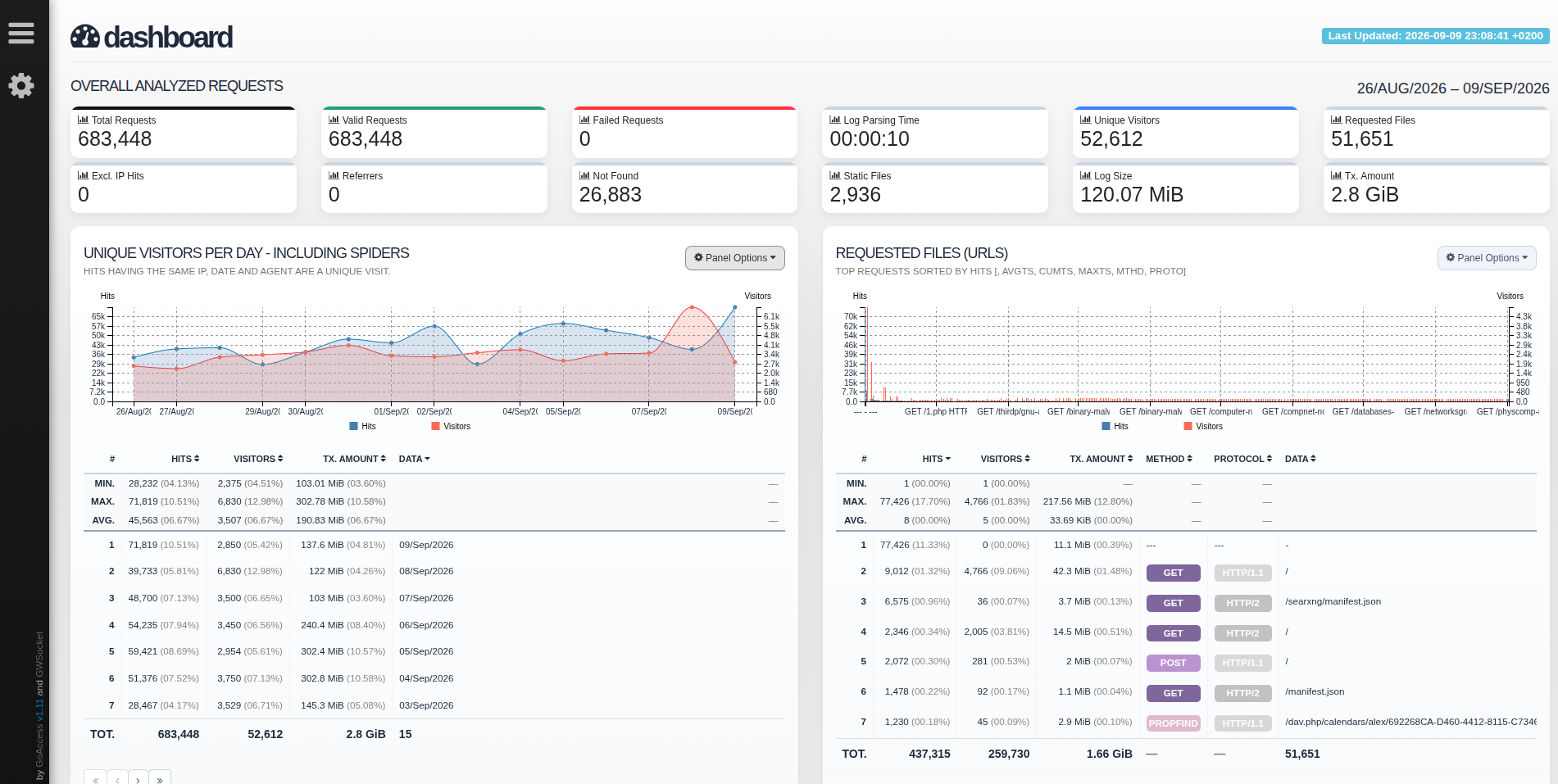
Between August 26 to and September 9, I got 683,448 requests. Average of around 45k hits per day, 3.5k visitors. without crawlers, 35k and 2k. Most hits were from datacenters in Germany, then France. But even the IP with the most hits was only 4.6% of all, the hits are spread over many IPs. Most visitors are crawlers, then Windows. I even saw some BSD users!
The automated scanners were asking for a few interesting endpoints:
/?rest_route=/batch/v1,/wp/?rest_route=/batch/v1,/wordpress/?rest_route=/batch/v1,/blog/?rest_route=/batch/v1,/blog/index.php?rest_route=/batch/v1: probably an attempt to run wp2shell; too bad, I don’t run wordpress./wp-login.php,/login,/api/auth/signin,/?redirect_url=/wp-login.php,/wp-login.php: attempts to find login pages, probably to then run dictionary/brute force attacks against them./gcp-credentials.json,/.env,/.env.local,/.env.backup,/.env.production: bots trying to sniff up some credentials/chosen.php: no idea/wp-content/plugins/hellopress/wp_filemanager.php: apparently a web shell from a fake plugin. Unfortunately I still don’t run wordpress./.git/config: I guess bots are hoping my git config, if exposed, has some sensitive stuff?/4PJcpMFsD8B.php,/3PJcpMFsD8B.php,/this_is_a_new_hello_world.php, : don’t know, seems like a wordpress exploration bot
The top referring search engine is duckduckgo, then bing, then google.br, then a few other googles, and even yahoo search. I see a noai.duckduckgo.com, which was looking for my blog posts. It seems I was included in a Netcraft survey, like this one. People from Reddit were looking for my troubleshooting blog posts. Somebody found my blog post about uBlock Origin through Kagi search. I got a hit from verfood.weebly.com and another from aressay.pages.dev, pointing to images from my lecture notes. I need to do something to disable hotlinking…it doesn’t matter that much with a low volume, but still, it’s better to do it anyway. Regarding LLM prompt loops: ChatGPT found one of my troubleshooting blog posts, Copilot found an image from my lecture notes, and some Perplexity user was trying to find API keys, settings, credentials, private keys, etc.
This all tracks with what I see on stats.alex.balgavy.eu. It also seems that bots (and maybe some people) found my RSS-bridge and SearxNG instances.
Firewall blocks
I use the ufw frontend for iptables, so I can see who was trying to access what ports on the actual machine.
The IPs are quite evenly distributed, either there are a lot of bots, or it was a lot of VPN sessions (or both).
Top ports: 8448 (Matrix/dendrite, from when I was running my own Matrix server), 23 (telnet, 4.5k requests), 22 (SSH, 1.5k requests), port 8080 (web servers, 850 requests), 3389 (RDP, 820), port 5060 (SIP, 512 requests), port 53 (DNS, 505 requests), port 1433 (Microsoft SQL server, 401 requests).
On average there were 4.7-4.8k attempts per day.
Checking btmp and auth.log for failed attempts
The btmp file shows who failed to authenticate with the server.
Checking it with last -f btmp shows no failed logins.
I attribute that to running SSH on a non-standard port.
While that does nothing for security, it at least gets rid of all the bots that would otherwise be spamming my VPS with login requests.
Similarly, auth.log does not show anything that I don’t recognize.
Next steps
First, I deleted all logs with shred, and truncated any that were currently open.
I’d done my analysis and didn’t need to keep that info around any longer.
Next, I customized the nginx log format. Here’s what I’m logging at the moment:
log_format analysis
    '$remote_addr - $remote_user [$time_iso8601] '
    '"$request" $status $body_bytes_sent '
    'rt=$request_time '
    'urt=$upstream_response_time '
    'ua="$http_user_agent" '
    'ref="$http_referer" '
    'upstream="$upstream_addr" '
    'upstream_status="$upstream_status"';
And I added this block to a new file in /etc/nginx/snippets/, and included it in relevant server definitions to prevent hotlinking (or at least make it harder):
location ~* \.(jpg|jpeg|png|gif|webp|svg)$ {
    valid_referers none blocked alex.balgavy.eu *.alex.balgavy.eu;
    if ($invalid_referer) {
        return 403;
    }
}
Then I changed logrotate settings and set rotate -1 for a lot of things: I don’t want to automatically delete anything, because I look at it and clear it out periodically.
Update a month later
Here’s what I found in my logs a month later (October 13).
I did the same Nginx access log analysis using goaccess, with this in the config file (somehow I couldn’t get it to parse the timezone offset part of the timestamp):
time-format %H:%M:%S
date-format %Y-%m-%d
log-format %h - %e [%dT%t+%^] "%r" %s %b rt=%T urt=%^ ua="%u" ref="%R" upstream="%^" upstream_status="%^"
From September 12 to October 13, there were 1.2 million requests. An average of 38k hits per day and 4k visitors. I didn’t find anything new in the URLs, just the same wordpress exploit and env exfiltration attempts. The IPs with the highest hits were known abusive IPs. As for user agents, many browser and AI scrapers. Apparently I had visitors using a Nokia 6230 and a Sony Ericsson W810i…who were trying to grab my env files and git config. Yeah those are fake, though it’s amusing to think of some random person browsing my site on a W810i. I found that someone downloaded my sheet music linked from MuseScore, glad that people still discover that. There were no static requests, so I probably fixed the hotlinking.
As for the firewall: UFW logged attempts from various IPs, known to be abusive. The same ports as before, around 5k blocked attempts per day.