newline
Table of Contents
A Guide to Writing Wireshark Dissectors
Wireshark allows you to capture network packets and analyze their contents. The packets are just a bunch of bytes, but Wireshark can analyze and “dissect” them into the various protocols. For example, it can recognize an Ethernet header, an IP header, and a UDP header, and it can then parse and display them in a tree structure. It contains dissectors for well-known protocols, but sometimes you might need to analyze a protocol that Wireshark doesn’t know, or one that’s completely custom. That’s when you would write your own dissector. However, the resources for learning how to do so are not great, so this post can hopefully fill that gap. Read on to learn how to write dissectors, from a very basic one up to a more complex chain of protocols.
I’m working on a GNU/Linux machine. I presume you already have Wireshark installed and configured. To write dissectors, you have a few options for programming languages. I’m going to be using Lua, but check the documentation for the full list of supported languages; the concepts will be similar across languages. I’m also going to use Python for some example code. I assume you have knowledge of both Lua and Python.
A basic one-field dissector
Let’s begin with something simple.
We’ll define a custom protocol that works over UDP.
In this protocol, the UDP packet contains four bytes corresponding to the ASCII string SYNC, and then the rest of the data.
If you wanted to send such a packet in Python, you would do:
import socket
sock = socket.socket(socket.AF_INET, socket.SOCK_DGRAM)
syncword = b"SYNC"
data = bytes([0xAA, 0xAA, 0xAA, 0xAA])
sock.sendto(syncword + data, ("127.0.0.1", 1234))
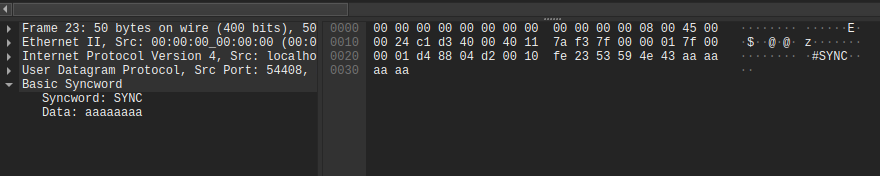
In Wireshark, this looks like so:

We want to display this as a tree view, with the syncword and then the data.
On my Linux machine, Wireshark dissectors go into `~/.local/lib/wireshark/plugins/`; find the correct path for your system in the documentation.
I'll put the following into `~/.local/lib/wireshark/plugins/basic-syncword-proto.lua`:
```lua
-- Register the protocol with an internal name and user-facing name
syncword_proto = Proto("basic_syncword", "Basic Syncword")
-- Define the fields
-- We specify an internal name (used in e.g. filters), and a user-facing name
-- (shown in the dissection tree)
proto_syncword = ProtoField.string("basic_syncword.syncword", "Syncword")
proto_data = ProtoField.bytes("basic_syncword.data", "Data")
-- Add the fields to the protocol
syncword_proto.fields = {
proto_syncword,
proto_data,
}
-- The main dissector function
-- `buffer` contains a packet buffer that we want to dissect, type Tvb
-- `pinfo` contains columns of packet list, type Pinfo
-- `tree` is tree root, type TreeItem
function syncword_proto.dissector(buffer, pinfo, tree)
-- If there's nothing to dissect, stop
local length = buffer:len()
if length == 0 then return end
-- Set the name shown in the "Protocol" column in the packet list
pinfo.cols.protocol = syncword_proto.name
-- Add a new subtree with the user-facing name of the protocol
local subtree = tree:add(syncword_proto, buffer(), syncword_proto.description)
-- The syncword starts at byte 0 in the buffer, and is 4 bytes long
subtree:add(proto_syncword, buffer(0, 4))
-- The data starts at byte 4, and continues until the end of the buffer
subtree:add(proto_data, buffer(4))
end
-- Register this protocol for UDP port 1234
local udp_port = DissectorTable.get("udp.port")
udp_port:add(1234, syncword_proto)First, the high-level concepts.
Wireshark has dissector tables for field types, similar to what you would use in the filters, e.g. tcp.port or udp.port.
The tables contain mappings from values to protocols.
For example, In english, the table udp.port says: for a given UDP port P, call the dissector of the protocol associated that port P.
The dissector gets passed a buffer (the bytes in the packet starting from the end of the previous protocol), the columns of the packet list , and the tree in the dissector view. It parses the bytes into fields, and adds those fields into the tree view. That’s it.
So then, here’s what the above code does.
First, we create our custom protocol.
We then define ProtoFields, and add them to the protocol: this is the complete list of fields we want to parse.
There are many different types of ProtoField, and we’ll see more later, but for now we just use a string for the syncword and a generic ‘bytes’ type for the rest of the data.
Then comes the dissector function, which adds a subtree to the dissector view, and adds the fields to that subtree.
Finally, so that Wireshark knows when to call our protocol, we add it to the udp.port dissector table, associated with the port 1234 (this also allows us to manually select it in the “Decode as” menu).
If you save the file and then press Control-Shift-L (or click Analyze => Reload Lua Plugins in the menu bar), you should see the following result:
If you don’t see it, check if your plugin is loaded through the menubar => Help = > About Wireshark => Plugins.
A more complex protocol
With the basics done, let’s move to a more realistic-looking protocol.
We’ll define it as:
- Header (6 bytes):
- 4 bytes syncword
- 2 bits version number
- 1 bit being a “side”. 0 should be displayed as “yin”, 1 as “yang”.
- 1 bit indication of a secondary header. If true, a 2-byte secondary header will be present.
- 6 bits sequence number
- 6 bits some computed check value
- Secondary header (optional, 2 bytes)
- Data
We see several new additions here. Firstly, we need to be able to extract parts of bytes, i.e., to mask bytes in the buffer. We need to associate values with strings, and the strings should then be displayed in the tree. We also have some conditional parts of the tree, which are not always present.
To send a packet like this, you could have the Python code:
import socket
sock = socket.socket(socket.AF_INET, socket.SOCK_DGRAM)
syncword = b"SYNC"

# version 01 = 1
# side "yin"
# secondary header present
# sequence number = 10
# computed check value = 52
header = bytes([0b01010010, 0b10110100])
secondary_header = bytes([0xff, 0xff])
data = bytes([0xAA, 0xAA, 0xAA, 0xAA])
sock.sendto(syncword + header + secondary_header + data, ("127.0.0.1", 1234))
Here’s the updated code; my explanation follows:
-- Register the protocol with an internal name and user-facing name
more_realistic = Proto("more_realistic", "More Realistic")

-- Define the fields
-- We specify an internal name (used in e.g. filters), and a user-facing name
-- (shown in the dissection tree). In some cases, we add extra arguments: how
-- the value should be displayed, if it should be mapped to some string, and if
-- we want to apply a bitmask.
proto_syncword = ProtoField.string("more_realistic.syncword", "Syncword")
-- Version number is 2 bits; the closest is 1 byte, so we use a uint8.
-- `base.DEC` means to display the value in decimal
-- `nil` means we don't have a value-to-display-string mapping
-- 0xc0 is a bitmask, that says to grab only the top 2 bits of anything that's passed in
proto_vn = ProtoField.uint8("more_realistic.vn", "Version Number", base.DEC, nil, 0xc0)
-- This field adds a key-to-value mapping, that indicates that false should be shown as "Yang", and true as "Yin"
proto_side = ProtoField.bool("more_realistic.side", "Side", base.DEC, { [1] = "Yang", [2] = "Yin" }, 0x20)
proto_has_sec_hdr = ProtoField.bool("more_realistic.has_sec_hdr", "Secondary header present", 1, nil, 0x10)
proto_seq = ProtoField.uint8("more_realistic.seq", "Sequence number", base.DEC, nil, 0xfc0)
proto_check_val = ProtoField.uint8("more_realistic.check_val", "Check value", base.DEC, nil, 0x3f)
-- Here instead of decimal, we want to show the value as hex
proto_sec_hdr = ProtoField.uint16("more_realistic.sec_hdr", "Secondary header", base.HEX)
proto_data = ProtoField.bytes("more_realistic.data", "Data")

-- Add the fields to the protocol
more_realistic.fields = {
  proto_syncword,
  proto_vn,
  proto_side,
  proto_has_sec_hdr,
  proto_seq,
  proto_check_val,
  proto_sec_hdr,
  proto_data,
}

-- The main dissector function
-- `buffer` contains a packet buffer that we want to dissect, type Tvb
-- `pinfo` contains columns of packet list, type Pinfo
-- `tree` is tree root, type TreeItem
function more_realistic.dissector(buffer, pinfo, tree)
  -- If there's nothing to dissect, stop
  local length = buffer:len()
  if length == 0 then return end

  -- Set the name shown in the "Protocol" column in the packet list
  pinfo.cols.protocol = more_realistic.name

  -- Add a new subtree with the user-facing name of the protocol
  local subtree = tree:add(more_realistic, buffer(), more_realistic.description)

  -- Create a new sub-subtree for the header
  local hdr_subtree = subtree:add(more_realistic, buffer(0, 6), "Primary Header")
  -- And add the fields
  hdr_subtree:add(proto_syncword, buffer(0, 4))
  -- The version number is the top 2 bits; we pass in the whole byte, and the
  -- mask defined in the ProtoField above handles the extraction of those bytes
  hdr_subtree:add(proto_vn, buffer(4, 1))
  hdr_subtree:add(proto_side, buffer(4, 1))
  hdr_subtree:add(proto_has_sec_hdr, buffer(4, 1))

  -- Similarly, we pass in both bytes, and the mask handles extracting the corect ones
  hdr_subtree:add(proto_seq, buffer(4, 2))
  hdr_subtree:add(proto_check_val, buffer(5, 1))

  -- Check the bit for the secondary header
  local has_sec_hdr = bit.band(bit.rshift(buffer(4, 1):uint(), 4), 1)
  -- If present, parse the secondary header
  if has_sec_hdr == 1 then
    subtree:add(proto_sec_hdr, buffer(6, 2))
    subtree:add(proto_data, buffer(8))
    -- Otherwise, just add the data
  else
    subtree:add(proto_data, buffer(6))
  end
end

-- Register this protocol for UDP port 1234
local udp_port = DissectorTable.get("udp.port")
udp_port:add(1234, more_realistic)
And here’s what it looks like:

Chaining protocols
Let’s continue with the same protocol, but with an adjustment:
- if the secondary header is all zeros, the data field contains a nested UDP packet
- else, the data field contains a nested custom packet:
- a header of 2 bytes
- and the data
- if there’s no secondary header, the data are just opaque bytes
- the type of data should be displayed in the tree as a string
With these changes, based on the secondary header, we want to delegate parsing of the data to some other dissector.